Cacti Seamless Pattern: What to Check Before You Download, Buy, or Use One
A well-made cacti seamless pattern can transform a plain surface into something memorable. Whether you are designing textiles, wrapping paper, website backgrounds, greeting cards, or invitations, the right pattern adds character without overwhelming the composition. But not every file you find online delivers what it promises. Many creators and entrepreneurs have learned the hard way that a pattern that looks charming in a thumbnail can fall apart when scaled, printed, or edited.
Understanding what makes a cacti seamless pattern truly functional—and where things commonly go wrong—will save you time, money, and frustration. This article walks through the practical details you should verify before committing to a file, helping you avoid the mistakes that lead to poor results.
Why a Cacti Seamless Pattern Appeals to So Many Creators
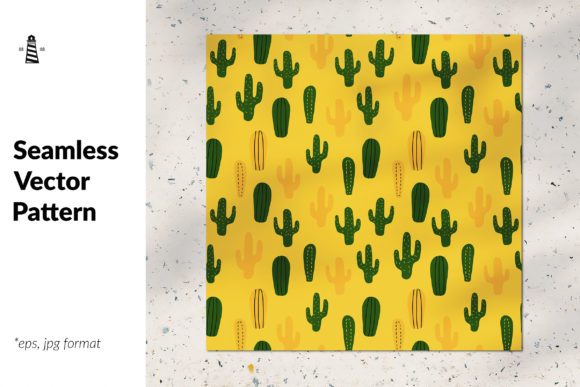
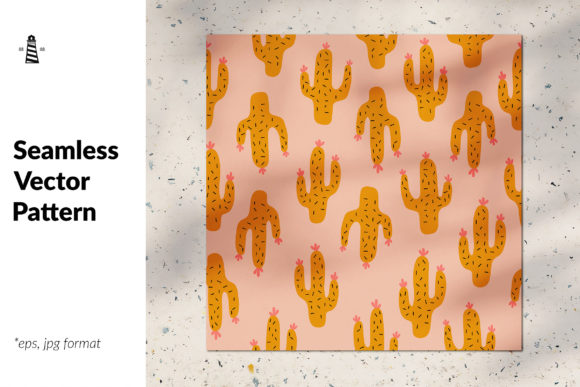
Cacti motifs have a natural warmth and versatility. They work across boho, southwestern, minimalist, and even modern tropical aesthetics. A seamless pattern with cute cactuses can feel playful on a children's bedroom wallpaper, refined on a greeting card, or bold on a tote bag. Hand-drawn vector art, in particular, brings an organic quality that mass-produced digital patterns often lack.
The promise of receiving an EPS file, an AI vector file, and a high-resolution JPG—especially at 69 x 69 inches at 300 dpi—suggests a product ready for professional use. That scale matters. It means you can print large surfaces without pixelation or visible seams. But the presence of those file formats alone does not guarantee quality. Knowing what to look for inside each file is where most people get tripped up.
Mistake 1: Assuming All Vector Files Are Equally Editable
Many buyers see "EPS file" or "AI vector file" and assume they can open the pattern, change colours, resize elements, or extract individual cacti with ease. That is not always true.
Some vector files arrive as a single flattened object. You cannot select a single cactus, change its colour, or move it without breaking the seamless repeat. If you plan to customise the pattern—maybe to match brand colours or adjust scale—you need a file built with individual, editable vector shapes.
What to check before buying: Look for product descriptions that mention "individual elements are editable" or "each shape is a separate vector path." If the listing shows a screenshot of the layers panel in Adobe Illustrator, that is a good sign. When in doubt, message the seller and ask whether the cacti, pots, flowers, and background shapes can be recoloured or moved independently.
Better approach: Choose a cacti seamless pattern that includes both a locked pattern swatch and a separate file with the hand-drawn vector elements arranged on an artboard. That way you get the ready-to-use pattern and the flexibility to create your own variations.
Mistake 2: Overlooking the Difference Between Raster and Vector in the Same Product
A listing that offers an EPS, AI, and JPG file can be misleading if the vector files actually contain embedded raster images. Some designers create a beautiful hand-drawn pattern, scan it, and then place that scan inside an EPS wrapper. The result looks like a vector file but behaves like a raster image. You lose the ability to scale infinitely, and the file size can become unwieldy.
True vector art uses mathematical paths. Every curve, line, and fill is calculated, not painted. When you zoom in on a genuine vector cactus, the edges stay razor-sharp. If you see pixelation, blurriness, or jagged edges at high zoom inside the EPS or AI file, you are looking at a raster image in disguise.
What to check: Open the EPS or AI file in a vector editing application and zoom to 400 percent or higher. Look at the edges of the cactus spines, the outlines of the pots, and any fine hand-drawn details. If they remain crisp, the file is genuine vector art. If they soften or break into squares, the pattern is not truly scalable.
Better approach: Seek products that explicitly state "100 percent vector" or "hand-drawn vector art." The description "100 vector art" in the prompt suggests the original is vector-based, but always verify visually. A quick zoom test takes thirty seconds and can prevent a ruined print run.
Mistake 3: Ignoring Repeat Quality Until It Is Too Late
A seamless pattern must repeat without visible lines, mismatched edges, or awkward jumps. Even a well-drawn cactus motif can fail if the repeat is not constructed correctly. Common issues include:
- Elements cut off at the edges that do not rejoin on the opposite side
- Colour mismatches where two tiles meet
- Obvious repetition that looks more like a grid than an organic flow
High-quality hand-drawn vector patterns often use a half-drop or brick repeat to create a more natural distribution of cacti across the surface. A simple block repeat can feel stiff, especially with larger motifs.
What to check: Ask for a preview that shows at least a 2x2 tile of the pattern. Better yet, request a mockup on a fabric or wallpaper sample. If the listing only shows a single tile, you cannot judge how the repeat behaves. A seller confident in their seamless construction will show multiple tiles together.
Better approach: Load the JPG preview into a simple tiling tool or even a presentation slide. Duplicate the image horizontally and vertically, then look at the seams. If you cannot find them, the pattern passes the test.
Mistake 4: Choosing a Pattern That Looks Cute but Lacks Versatility
A cacti seamless pattern with highly specific colours, extreme detail, or oversized motifs may look delightful on screen but limit your applications in practice. For example, a pattern with tiny, intricate spines and very fine hand-drawn lines might reproduce well on a greeting card but lose definition on a fabric with lower print resolution.
Similarly, a pattern that relies on a very narrow colour palette may clash with other elements in your design. If you are a small business owner designing a line of notebooks, a pattern that only works against a hot pink background reduces your flexibility.
What to check: Consider where you plan to use the pattern before you buy. If you need it for multiple applications, look for a design that offers:
- A neutral or light background option
- Clear shapes that work at different scales
- Enough negative space that the pattern does not feel cluttered when repeated
Better approach: Download a pattern that includes a monochrome or simplified version. Some designers offer the same cacti seamless pattern in several colourways. That variety gives you options without buying multiple products.
Mistake 5: Misunderstanding the Scale of a 69 x 69 Inch File
The size specification—69 x 69 inches at 300 dpi—sounds impressive, and for large-format printing it is exactly what you need. But some buyers misunderstand this to mean the pattern itself is 69 inches square. In reality, that is the size of the canvas on which the pattern tile sits, often with the seamless repeat built into a smaller swatch.
If you open the JPG and see a single tile of cacti surrounded by a large white area, you might need to define the pattern manually in your design software. That is straightforward in programs like Illustrator or Photoshop, but if you are a beginner, it can feel confusing.
What to check: Read the product description carefully. Does it say the JPG is ready to print as-is, or does it specify that you need to tile the pattern? Some sellers include a pre-tiled JPG that fills the entire 69-inch canvas. Others provide a single tile that you must repeat.
Better approach: If you are not comfortable tiling patterns yourself, look for a file that comes pre-tiled or includes clear instructions. Many vector files also include a pattern swatch that you can load directly into Adobe Illustrator or Affinity Designer.
Mistake 6: Overlooking Licensing and Usage Rights
This is the mistake that can cost the most. A cacti seamless pattern may be sold for personal use only. If you plan to use it on products you sell—fabric, stationery, mugs, digital downloads—you need a commercial licence.
Some sellers restrict how many copies you can produce, what industries you can use the pattern in, or whether you can include it in digital products. Others grant full commercial rights but do not allow resale of the pattern file itself.
What to check: Look for a clear licence statement in the product listing. Terms like "personal use only," "commercial use allowed," "extended licence available," or "unlimited commercial use" each mean something different. If the licence is not visible, contact the seller before purchasing.
Better approach: Keep a record of your licence for every pattern you buy. If you build a product line around a cacti seamless pattern, you want proof of your right to use it commercially. A screenshot of the licence or a saved email confirmation can save you from legal trouble later.
Mistake 7: Letting the Cutest Design Override Practical Considerations
Hand-drawn vector patterns with carefully detailed cacti are genuinely charming. It is easy to fall in love with a design and overlook small flaws in construction, file format, or scalability. The most beautiful pattern in the world will not serve you well if the file is difficult to use, the repeat is visible, or the colours do not translate to your intended medium.
What to check: Before you buy, write down your requirements. File format, scale, editability, licence, and repeat style. Then compare each pattern against that list. If a pattern meets your criteria and happens to be adorable, that is a win. But let functionality lead the decision.
Better approach: Bookmark a few favourite cacti seamless pattern options and review them side by side. Compare their technical specifications as carefully as you compare their visual appeal.
Practical Advice for Choosing Your Cacti Seamless Pattern
Start by identifying your primary use case. Are you printing fabric for a small run of home decor pillows? Designing digital wallpaper for a website? Creating a set of wedding invitations? Each application places different demands on the pattern file.
For textiles, a seamless pattern with cute cactuses should have sturdy lines and clear contrast between elements. Fine details may be lost on woven fabric. For digital use, file size and colour accuracy matter more. For print products like greeting cards or gift wrap, you need the full 300 dpi resolution and a seamless repeat that holds up at close viewing distance.
When you find a pattern that seems to fit, download any free sample or low-resolution preview the seller offers. Run it through a simple test: apply it to a mockup of your product, tile it in a design application, or print it at small scale. That short evaluation can reveal problems that are invisible in a polished product photo.
Finally, build a relationship with designers whose work you trust. Hand-drawn vector art takes real skill, and a designer who understands seamless construction, proper file preparation, and clear licensing will produce patterns you can rely on again and again. Once you find a cacti seamless pattern that works well for your projects, check their portfolio for other designs. Consistent quality across multiple products is a strong sign of a professional.
A cacti seamless pattern, carefully chosen, becomes more than a decorative element. It becomes a foundation for your creative work. Taking the time to check the file format, repeat quality, editability, scale, and licence before you buy ensures that what looks good in the preview will perform just as well in your hands.